Digital menu board for restaurants — lunch and dinner switch automatically.
Design your daily and menu cards once and let them appear on the screen at the right time — in place of the video, without anyone having to switch over.
From card to screen in three steps.
Design the card
In the “Text content” menu you write the card and format it freely: font, size, colour, tables and a background image, for example parchment or your logo.
Set the times
In the project you assign the cards and decide when they appear. Enter lunch and dinner times once and apply them to every weekday.
Runs by itself
At the set time the card replaces the video. If the text is long, it scrolls automatically. Afterwards your normal programme carries on.
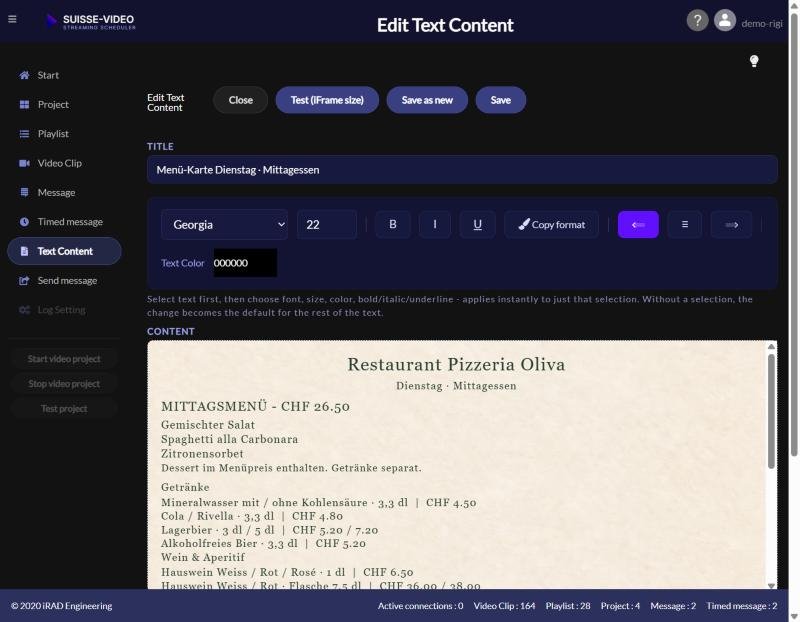
Design the card: choose font, size, colour and background freely.
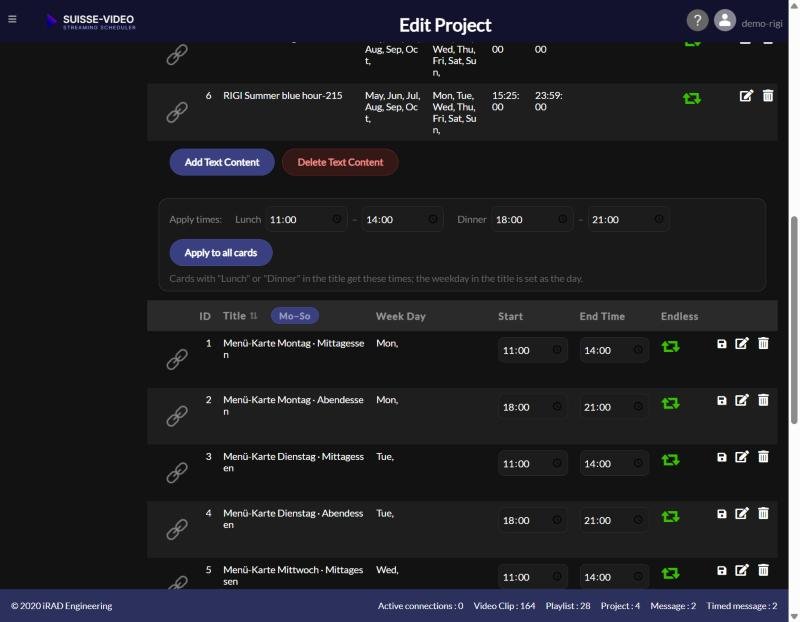
Apply times: enter lunch and dinner once, apply to all cards.
What the menu board brings in daily operation.
Lunch and dinner automatically
The lunch card appears at lunchtime, the dinner card in the evening — without anyone having to remember.
Plannable per weekday
You can assign each card to a specific weekday, for example a separate daily menu from Monday to Sunday.
Video and card combined
Between the card times your normal programme runs, for example brand films or atmosphere images.
What you need.
A screen with internet access, a current browser (Chrome, Firefox or Edge) and a SUISSE-VIDEO account. You can try the function yourself with the free trial access. The step-by-step guide with screenshots is in the Help. The restaurant demo shows how a video looks embedded in a restaurant website.
Try the menu board free for 30 days.
We set up a demo project for you — no obligation, no credit card.
Ask us
Can't find what you're looking for? Contact us via our form or give us a call. Contact form · +41 76 318 12 25