Practical ideas for your restaurant screen
Practical advice on digital menu boards and scheduled video content, with examples to try in your restaurant.
A new season on your screen: what needs updating?
A new season brings different offers. Changing the background is not enough: check times, prices, videos and links before the new display begins.
Choosing screen videos: what works without sound?
Videos in reception areas, restaurants and shop windows are often watched without sound. The main message needs to be visible, even when someone starts watching halfway through.
Your first screen: how to test it in your business
Begin with one location and one clear purpose. A small test can show whether visitors understand the content and whether your team can maintain the display in everyday use.
Who keeps your screen content up to date?
A schedule displays prepared content. Someone still needs to check whether prices, dates and contact details are correct. Clear responsibilities help during holidays and staff changes too.
QR codes on screens: help viewers take the next step
A QR code helps only when people know why they should scan it. Name the destination and check that the journey works on a smartphone.
How long should an on-screen message be?
Screen text needs to make sense in the time available. A fixed word count matters less than whether people can understand the message and next step from where they stand or sit.
Show training, dates and club life on your screen
What is happening today? Where does the group meet? How can newcomers arrange a trial session? A screen at the clubhouse helps when it answers these questions briefly.
What content helps visitors in reception and waiting areas?
Visitors arriving for an appointment first need to know where to check in and what happens next. A screen helps when it answers those questions before showing promotions.
What does your shop window show after closing time?
Your shop is closed, but people still stop at the window. A screen can explain what you offer, when you reopen and how interested customers can contact you.
What to check when your screen is not playing video
Missing video can have several causes. Start by checking what is still visible. Then investigate the device, connection, video source and schedule in a clear order.
Recorded landscape video or live view: what is your screen really showing?
Sunshine on a screen does not necessarily mean sunshine on the mountain. Clear labels help visitors distinguish recorded scenery from a current view.
What should you show on a screen at the lower cable car station?
When does the cable car run? Where do visitors board? When is the last trip down? A screen helps when it answers these questions quickly and clearly identifies current information.
Promote hotel events on your screen
A live music evening or wine tasting needs more than an appealing title. Guests need to know when and where it takes place, what it costs and how to attend.
Local trip ideas on your hotel screen: help guests plan their day
A landscape video can spark interest. A useful trip suggestion also explains what to expect, how much time to allow and where to find current information.
What should you show on a hotel lobby screen?
Where is breakfast served? When is check-out? What can guests do today? A lobby screen is useful when it answers these questions clearly and briefly.
From breakfast to dinner: plan your restaurant screen
A lunch menu is only useful while guests can order from it. Schedule your screen around what the kitchen actually serves, including the gaps between meals.
What should your daily specials screen include?
Guests need to know what they are ordering and what the price covers. A few clear details are more useful than a long description.
Where should you place a screen in your restaurant?
At the entrance, guests want a quick impression of your restaurant. At the counter, they need to choose what to order. In the dining area, their needs are different. Plan the location and content together.
Who keeps your digital menu up to date?
A daily special has sold out, but it is still on the screen. A clear process helps your team report the change, update the menu and check the display.
What should your restaurant screen show between lunch and dinner?
Lunch service has finished, but dinner is still a few hours away. Use your screen to showcase your food and share useful information with guests in the meantime.
Make your daily specials easy to read at a glance
Keep text concise, place prices beside each dish and use an uncluttered background. Learn how to design your daily menu and check that guests can read it.
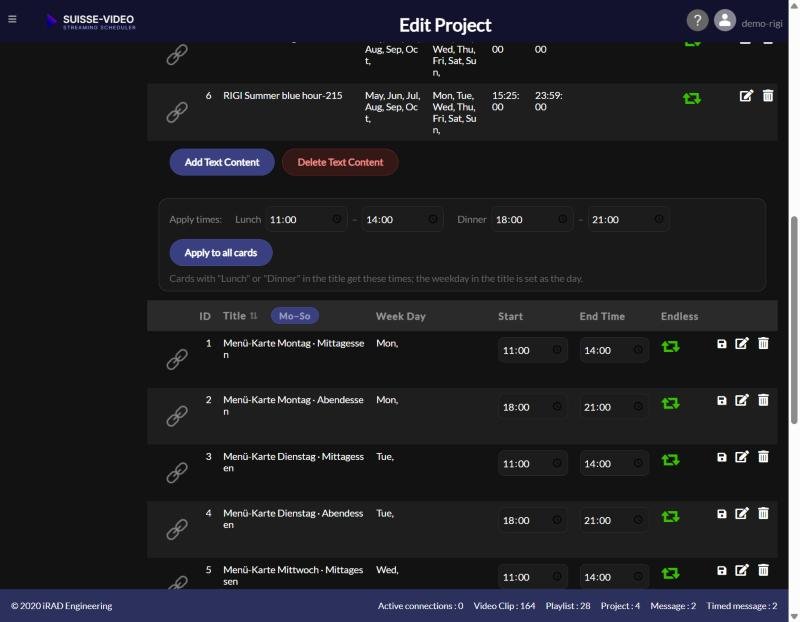
Show the right menu at lunch and dinner — automatically
Schedule your lunch and dinner menus to appear automatically, with videos in between. Includes an example timetable and a simple test before you start.